Flappy Hardcore





Flappy Hardcore
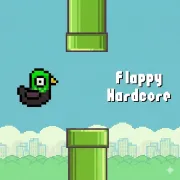
Flappy Hardcore is a punishing side-scrolling game that is built with one specific goal in mind: completely destroying your muscle memory. Visually and fundamentally, the game draws heavy inspiration from the legendary one-button mechanics of early mobile arcade games. The basic loop remains instantly recognizable: you control a character flying horizontally across the screen, trying to clear gaps between vertical obstacles. Every individual tap or click provides a brief burst of upward momentum, and the moment you stop clicking, gravity aggressively pulls your character back down toward the floor.
While classic titles relied on a single, predictable rhythm, this hardcore iteration is designed to intentionally disrupt your muscle memory. There are no health bars, shields, or checkpoints here. Touching a pipe, hitting a moving hazard, or slamming into the ceiling or floor triggers an immediate game over, forcing you to maintain absolute concentration from the very first second.
Flappy Hardcore Game Modes
- Inverted Controls Mode: Your fundamental inputs are flipped on their head, turning your upward taps into sudden drops and completely reversing your basic flight instincts.
- Speed Boost & Ghost Modes: The game suddenly spikes your horizontal velocity, dramatically narrowing your reaction window, while Ghost Mode introduces visual distortions that mask upcoming threats.
- Precision Challenges: These sections force you to thread the needle through incredibly tiny pipe gaps or manage abrupt, jarring zigzag flight patterns.
- The Hold-to-Fly Variation: Shifting the input method entirely from quick tapping to delicate button-holding to manage your altitude, completely changing the active gravity physics.
Gameplay Overview
Core Mechanics
Your primary goal is to pass safely through endless pipe formations and moving obstacles without touching the environment. Because the maps constantly introduce bouncing floors and shifting pipe layouts mid-flight, static positioning will get you killed. You have to constantly recalculate the height of your arc based on the active mode modifier.
Controls
- Use the Left Mouse Button (LMB) to click and lift your character
Related Modern Arcade Games to Try